mask()
Masks part of the image with another.
mask() uses another image's alpha channel as the alpha channel for this image. Masks are cumulative and can't be removed once applied. If the mask has a different pixel density from this image, the mask will be scaled.
Examples
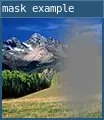
require 'L5'

function setup()
  size(100,100)
  windowTitle('mask example')

  -- Load the images
  photo = loadImage('assets/rockies.jpg')
  maskImage = loadImage('assets/mask2.png')

  -- Apply the mask
  mask(photo, maskImage)

  -- Display the image
  image(photo, 0, 0, width, height)

  describe('An image of a mountain landscape. The right side of the image has a faded patch of white.')
end
Syntax
mask(targetImage, maskImage)
Parameters
| Parameter | |
|---|---|
| targetImage | image: texture that mask will be applied to. |
| maskImage | image: texture that will be applied as a mask. |
Related
This reference page contains content adapted from p5.js and Processing by p5.js Contributors and Processing Foundation, licensed under CC BY-NC-SA 4.0.