Creating Functions
Previous tutorial: Creating Variables
You now know how to call functions, use variables, and create your own variables. This tutorial shows you how to create your own functions!
Why Functions?
Remember that a program is a lot like a recipe: a recipe is a list of steps that you follow in order, and a program is a list of function calls that the computer follows in order.
Creating a function is like writing your own recipe that you can reference from other recipes.
Imagine a cake recipe that says "follow the icing recipe on page 42" - the cake recipe doesn't need to know all the details about making icing, it just references the icing recipe. You could also reference the icing recipe from other recipes, like a cookie recipe.
Creating functions works the same way. You can take a complicated task (like drawing a flower) and put it in its own function. Then you can call that function whenever you need to do that task, without worrying about all the details.
Creating a Function
To create a function in Lua, you use the function keyword, followed by the name of your function, followed by parentheses (), then the code that should run when the function is called, and finally the end keyword:
function drawFlower()
  fill(255, 128, 0)
  circle(150, 150, 100)
  fill(255, 0, 0)
  circle(150, 150, 50)
end
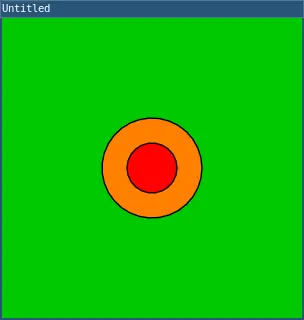
This creates a function named drawFlower that draws a simple flower.
To call your function, write its name followed by parentheses:
require("L5")

function setup()
  size(300, 300)
end

function draw()
  background(0, 200, 0)
  drawFlower()
end

function drawFlower()
  fill(255, 128, 0)
  circle(150, 150, 100)
  fill(255, 0, 0)
  circle(150, 150, 50)
end
This code creates a drawFlower() function and calls it from the draw() function.
Parameters
Just like the functions L5 provides can take parameters, your functions can too!
To create a function that takes parameters, add variable names inside the parentheses:
function drawFlower(flowerX, flowerY)
  fill(255, 128, 0)
  circle(flowerX, flowerY, 100)
  fill(255, 0, 0)
  circle(flowerX, flowerY, 50)
end
Now the drawFlower() function takes two parameters: flowerX and flowerY. Inside the function, you can use these parameters like variables.
To call a function with parameters, pass values inside the parentheses:
require("L5")

function setup()
  size(300, 300)
end

function draw()
  background(0, 200, 0)
  drawFlower(100, 150)
  drawFlower(200, 150)
end

function drawFlower(flowerX, flowerY)
  fill(255, 128, 0)
  circle(flowerX, flowerY, 100)
  fill(255, 0, 0)
  circle(flowerX, flowerY, 50)
end
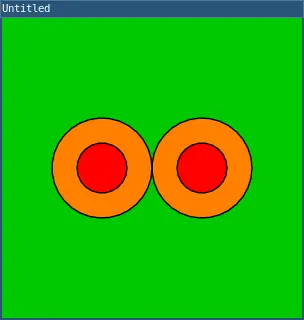
This code draws two flowers: one at position (100, 150) and another at (200, 150).
Multiple Parameters
You can create functions with multiple parameters:
function drawFlower(flowerX, flowerY, petalSize)
  fill(255, 128, 0)
  circle(flowerX, flowerY, petalSize)
  fill(255, 0, 0)
  circle(flowerX, flowerY, petalSize / 2)
end
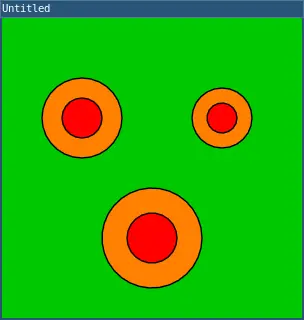
Now you can draw flowers at different positions AND sizes:
require("L5")

function setup()
  size(300, 300)
end

function draw()
  background(0, 200, 0)
  drawFlower(80, 100, 80)
  drawFlower(220, 100, 60)
  drawFlower(150, 220, 100)
end

function drawFlower(flowerX, flowerY, petalSize)
  fill(255, 128, 0)
  circle(flowerX, flowerY, petalSize)
  fill(255, 0, 0)
  circle(flowerX, flowerY, petalSize / 2)
end
Organizing Your Code
Functions help you organize your code by breaking it into smaller pieces. Each function handles one task, making your code easier to read and modify.
Here's a more complete example:
require("L5")

function setup()
  size(400, 400)
end

function draw()
  drawSky()
  drawGround()
  drawHouse(100, 250, 100)
  drawHouse(250, 250, 120)
end

function drawSky()
  background(135, 206, 235)
end

function drawGround()
  fill(34, 139, 34)
  rect(0, 300, width, 100)
end

function drawHouse(x, y, houseSize)
  -- House body
  fill(200, 100, 50)
  rect(x, y, houseSize, houseSize)

  -- Roof
  fill(150, 50, 50)
  triangle(x, y, x + houseSize / 2, y - 50, x + houseSize, y)

  -- Door
  fill(100, 50, 0)
  rect(x + houseSize / 2 - 15, y + houseSize - 40, 30, 40)
end
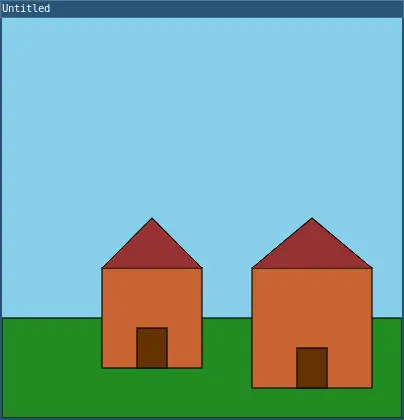
This code is organized into separate functions for drawing the sky, ground, and houses. Each function has a clear purpose!
Functions Calling Functions
Functions can call other functions:
require("L5")

function setup()
  size(300, 300)
end

function draw()
  background(0, 200, 0)
  drawGarden()
end

function drawGarden()
  drawFlower(80, 100, 80)
  drawFlower(220, 100, 60)
  drawFlower(150, 220, 100)
end

function drawFlower(flowerX, flowerY, petalSize)
  fill(255, 128, 0)
  circle(flowerX, flowerY, petalSize)
  fill(255, 0, 0)
  circle(flowerX, flowerY, petalSize / 2)
end
The draw() function calls drawGarden(), which calls drawFlower() multiple times. This helps organize your code into logical pieces!
Return Values
Functions can also return values using the return keyword:
function add(a, b)
  return a + b
end
You can then use the returned value:
result = add(5, 3)  -- result is 8
circle(100, 100, add(50, 30))  -- draws circle with diameter 80
This is useful when you want a function to calculate something and give you back the result.
Practice
Before moving on to the next tutorial, practice creating your own functions!
Here are some ideas:
- Create a
drawStar()function that takes x, y, and size parameters - Create a
drawTree()function and use it to draw a forest - Create a
drawCar()function and draw multiple cars on a road - Take your drawing from previous tutorials and organize it using functions
- Create a
randomColor()function that returns a random color value
Next tutorial: If Statements
This tutorial is adapted from Creating Functions by Happy Coding, licensed under CC BY 4.0.