Conditions
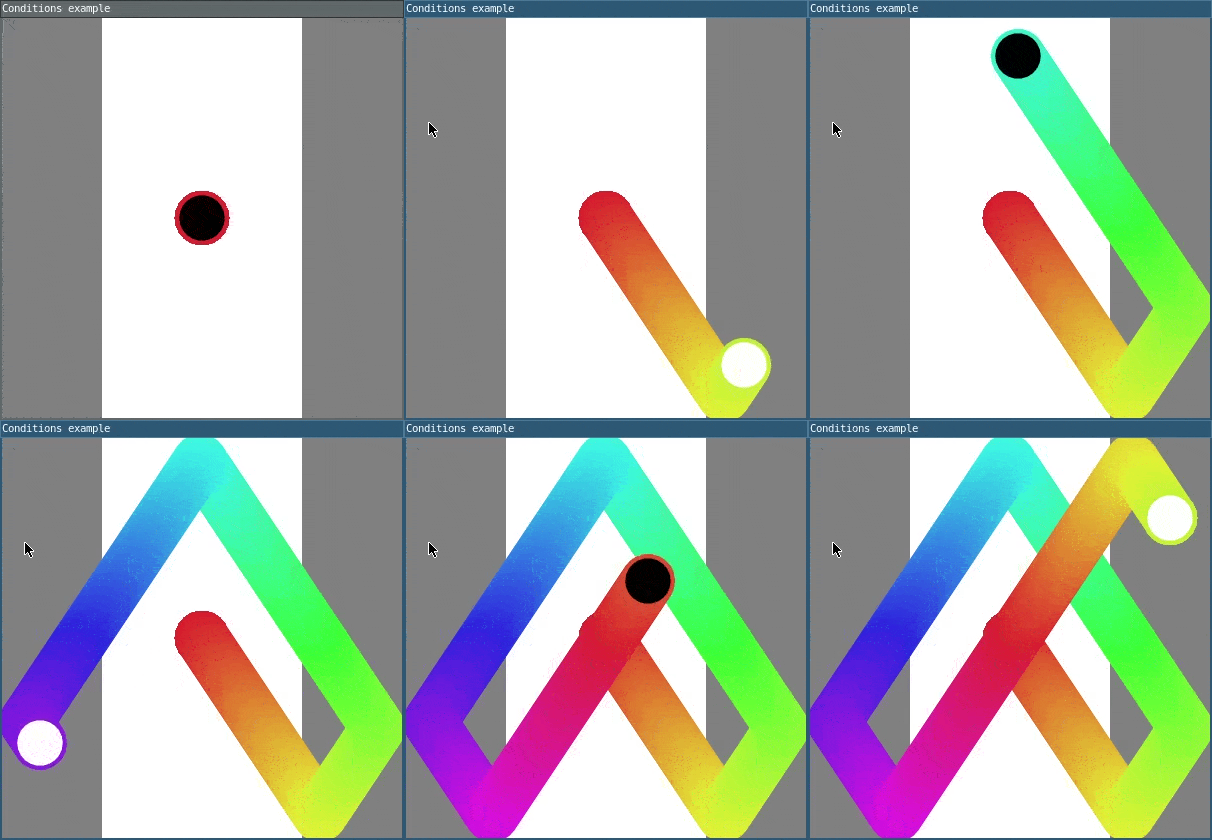
If and else statements allow a block of code to run only when a certain condition is true. This example only animates when the mouse is held down. This is because of the if statement on line 59. You can read more about if and else statements in the L5 reference.
Comparison operators help to form conditions by comparing two values. In this example, the hue of the circle resets to zero when the hue is at least 360 because of the if statement on line 69. You can read more about relational operators in the Programming in Lua book.
Logical operators allow conditions to be combined. and checks that both conditions are true. The circle in this example has a black fill when it is toward the horizontal center of the canvas, and it has a white fill when it is not. This is because of the if statement on line 52, which checks that the circle’s x position is at least 100 and also no more than 300. or checks that at least one of the conditions is true. The circle reverses horizontal speed when it reaches the left or right edge of the canvas because of the if statement beginning on line 82.
require("L5")

-- Position variables
local circlePositionX = 200
local circlePositionY = 200

-- Speed variables
local circleSpeedX = 2
local circleSpeedY = 3

-- Radius variable
local circleRadius = 25

-- Hue variable
local circleHue = 0

function setup()
  windowTitle('Conditions example')

  -- Create 400x400 canvas
  size(400, 400)

  -- Cover canvas with white
  background(255)

  -- Draw ellipses using their radius
  ellipseMode(RADIUS)

  -- Draw rectangles on either side of the canvas
  noStroke()
  fill(128)
  rect(0, 0, 100, height)
  rect(300, 0, 100, height)

  -- Use Hue Saturation Brightness for colors on circle trail
  colorMode(HSB)

  -- Set stroke weight to 4 units
  strokeWeight(4)

  -- Create screen reader accessible description
  describe(
    'A circle starts in the center of the canvas. When the user holds the mouse down, the circle bounces around the canvas, its inside switches between black and white, and its outline fades between colors, leaving a rainbow trail.'
  )
end

function draw()
  -- Set stroke color using current hue
  stroke(circleHue, 80, 90)

  -- If circle's x position is between 100 and 300
  if circlePositionX >= 100  and  circlePositionX <= 300 then
    -- Set fill color to black
    fill(0)

    -- Otherwise
  else
    -- Set fill color to white
    fill(255)
  end

  -- Draw circle at current position
  circle(circlePositionX, circlePositionY, circleRadius)

  -- If mouse is held down, animate the sketch
  if mouseIsPressed == true then
    -- Add speed to circle's position to make it move
    circlePositionX = circlePositionX + circleSpeedX
    circlePositionY = circlePositionY + circleSpeedY

    -- Increase hue by 1
    circleHue = circleHue + 1
  end

  -- If hue has reached maximum value
  if circleHue >= 360 then
    -- Reset hue to 0
    circleHue = 0
  end

  -- If circle is beyond left or right edge
  if
    circlePositionX < circleRadius  or
    circlePositionX > width - circleRadius
  then
    -- Reverse horizontal speed
    circleSpeedX = -circleSpeedX
  end

  -- If circle is beyond top or bottom edge
  if
    circlePositionY < circleRadius  or
    circlePositionY > height - circleRadius
    then
    -- Reverse vertical speed
    circleSpeedY = -circleSpeedY
  end
end
Related Examples
- Basic Pong - A simple program demonstrating a basic implementation of pong with enemy AI player
- Drawing Lines - A drawing program demonstrating HSB colorMode
- Animaton with Events - Pause and resume animation.
Conditions: Inspired by the Conditional Shapes Example by Prof. WM Harris. Revised by Caleb Foss. From 2024 onwards, edited and maintained by p5.js Contributors and Processing Foundation. Adapted to L5 2025. Licensed under CC BY-NC-SA 4.0.