Calling Functions
Previous tutorial: Welcome to coding
In L5 (and most other programming languages), one of the tools you'll use most often is the ability to call a function.
Writing a program is a little bit like writing a recipe. Similar to how a recipe is a set of steps that another person follows, a program is a set of steps that the computer follows.
A single step of a recipe might be something like "preheat the oven to 350 degrees" or "add 2 cups of flour", and you might write each step on its own line. The other person then follows those steps in order, one after the other, to bake a cake.
preheat oven to 350 degrees
get a large bowl
add 2 cups of flour
add 1 cup of sugar
...
This is similar to how a computer program works. A program is a set of instructions that tells the computer to follow a series of steps. Each step is written on its own line, and the computer follows the instructions one at a time.
What is a Function?
A function is one of those steps. Calling a function is giving the computer a single instruction that tells it to do one thing.
To call a function in L5, you need to do three things:
- Write the name of the function
- Add parentheses
()after the function's name - Inside the parenthesis, add any parameters that the function requires, separated by commas
Note: Unlike some languages, Lua doesn't require semicolons at the end of lines!
Parameters
In our recipe instructions, imagine if one of the steps just said "preheat the oven" - that wouldn't be enough information! What temperature should you use? That step requires more information: specifically, a temperature.
It's the same idea when you're writing code. Computers are very simple, so they only know how to do exactly what you tell them. When you ask a computer to jump, it's going to ask you: how high?
The values that you give to a function are called parameters (or arguments). Different functions require different parameters!
A Basic Program
Here's a simple L5 program you might remember from the Welcome to Coding tutorial:
require("L5")

function setup()
  size(400, 400)
end

function draw()
  background(220)
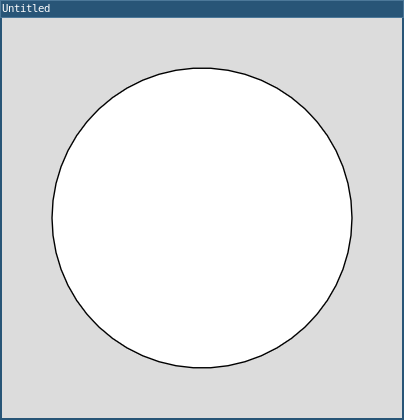
  circle(200, 200, 300)
end
The parts with function setup() and function draw() don't need to make sense right now; you'll learn more about that in the "creating functions" tutorial. For now, read the code line-by-line, like you would read a recipe. Think about what each line tells the computer to do, and what effect that has on your sketch.
size(400, 400)tells the computer to create a drawing window that's 400 pixels wide and 400 pixels highbackground(220)tells the computer to draw a gray background on the canvascircle(200, 200, 300)tells the computer to draw a circle with an x position of 200, a y position of 200, and a diameter of 300 pixels
The Coordinate System
When you call a function like circle(), you have to pass parameters in for the x and y position. But how do x and y positions work in L5?
You're probably used to seeing graphs in math class with crossed axes and (0, 0) in the center:
However, in L5, the coordinate system has (0, 0) in the upper-left corner, with x increasing to the right and y increasing downward:
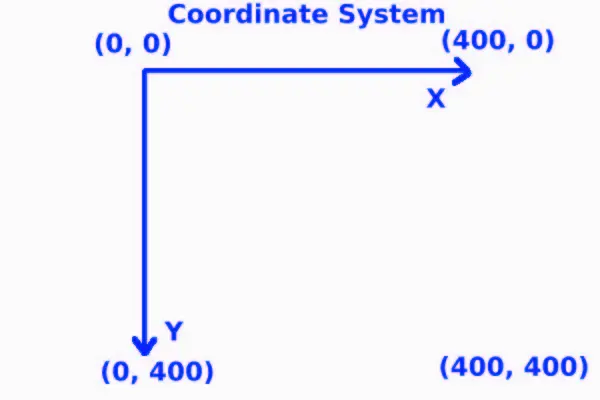
So when you call circle(200, 200, 300), you're drawing a circle:
- 200 pixels from the left edge
- 200 pixels from the top edge
- with a diameter of 300 pixels
This takes some getting used to, but after a while it will feel natural!
Draw Order
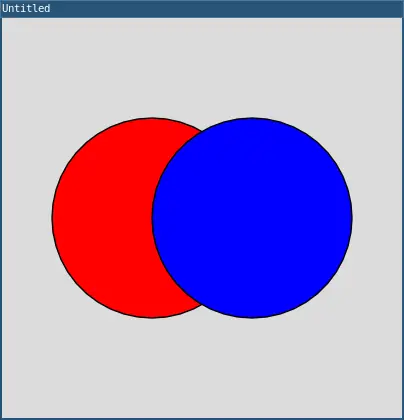
The computer draws things in the order you write them, from top to bottom. This means that shapes drawn later appear on top of shapes drawn earlier.
require("L5")

function setup()
  size(400, 400)
end

function draw()
  background(220)

  -- This circle is drawn first, so it's in the back
  fill(255, 0, 0)  -- Red
  circle(150, 200, 200)

  -- This circle is drawn second, so it appears on top
  fill(0, 0, 255)  -- Blue
  circle(250, 200, 200)
end
The blue circle appears in front of the red circle because it's drawn after the red circle.
Comments
The -- within the lines of code are comments. They are used for writing yourself notes about your code. They are for humans and anything in the line afterward is skipped by the compiler when processing your code.
Color
You might have noticed the fill() function in the example above. This function sets the color that shapes will be drawn with.
Colors in L5 can be specified in a few different ways:
Grayscale (one parameter):
fill(220)  -- Light gray
fill(0)    -- Black
fill(255)  -- White
RGB (three parameters):
fill(255, 0, 0)    -- Red
fill(0, 255, 0)    -- Green
fill(0, 0, 255)    -- Blue
fill(255, 255, 0)  -- Yellow
RGB stands for Red, Green, Blue. Each value is between 0 and 255, representing how much of that color to include.
RGBA (four parameters):
fill(255, 0, 0, 127) -- Semi-transparent red
The fourth parameter is the alpha (transparency), where 0 is fully transparent and 255 is fully opaque.
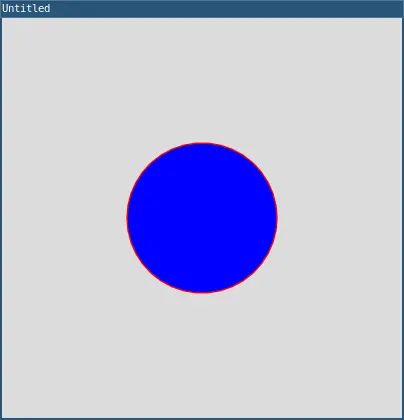
You can also use stroke() to set the color of the outline:
require("L5")

function setup()
  size(400, 400)
end

function draw()
  background(220)

  stroke(255, 0, 0)  -- Red outline
  fill(0, 0, 255)    -- Blue fill
  circle(200, 200, 150)
end
There are other color modes and ways to specify color, but it's important to understand grayscale and RGB values at first.
The L5 Reference
Now you've seen a few functions and their parameters, but L5 has many other functions you can call. Your new best friend is the L5 reference!
The L5 reference (found at L5lua.org/reference) is a list of everything that L5 gives you, and it should be your first stop when you have a question about how to do something.
For example, let's say you wanted to draw a rectangle instead of a circle. How would you know what to do? Look in the reference! You'll find the rect() function which takes four parameters: x position, y position, width, and height.
rect(100, 100, 200, 150)
This draws a rectangle with its top-left corner at position (100, 100), with a width of 200 pixels and a height of 150 pixels.
Drawing Multiple Shapes
You can call multiple functions to draw multiple shapes:
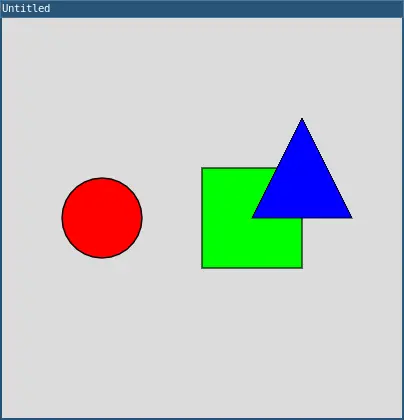
require("L5")

function setup()
  size(400, 400)
end

function draw()
  background(220)

  -- Draw a red circle
  fill(255, 0, 0)
  circle(100, 200, 80)

  -- Draw a green rectangle
  fill(0, 255, 0)
  rect(200, 150, 100, 100)

  -- Draw a blue triangle
  fill(0, 0, 255)
  triangle(300, 100, 350, 200, 250, 200)
end
Each function call is on its own line, and the computer executes them in order from top to bottom.
Practice
The best way to learn how to code is by writing code. Before you move on to the next tutorial, practice calling functions!
Give yourself a goal, and then read through the L5 reference to figure out how to accomplish that goal. Write some code and see what happens.
Here are some ideas to get you started:
- Draw a smiley face
- Draw a flower or a garden
- Draw a rainbow
- Draw a dog or cat
- Draw a house
Come up with a scene that you want to draw, and then write a program that draws it by calling L5 functions!
Next tutorial: Using Variables
This tutorial is adapted from Calling Functions by Happy Coding, licensed under CC BY 4.0.