Welcome to Coding
Welcome! This tutorial series will show you how to code using a tool called L5. L5 is designed for people who want to create interactive, visual programs - whether you're an artist, designer, student, or just curious about coding!
What is a Program?
You probably use computer programs every day. The web browser you're using to read this tutorial is a program. Games, drawing apps, music players - these are all programs.
Programs tell your computer what to do.
Your web browser tells your computer to display content from a website. A music player tells your computer to play audio files. A game tells your computer to show graphics and respond to your input.
What is Code?
Computers can't understand English (at least not yet), so programs are written in a language that computers can understand. These computer languages are called code.
Coding (also called programming) is the process of writing that code!
What is L5?
L5 is a creative coding tool designed for making interactive, visual programs. It's perfect for:
- Creating art and animations
- Making games
- Building interactive visualizations
- Learning programming fundamentals
- Experimenting with ideas
L5 is part of a family of creative coding languages started by Processing. They each have their own uses and advantages. L5 is designed to be fast, flexible, lightweight, easy to learn, and capable of running well on an extremely wide variety of computers from the very old to the recent.
L5 programs are often called sketches to evoke the feeling of doodling on a piece of paper. Just like you don't have to know what a drawing will look like when you start sketching, you don't have to know what the end result will look like when you start coding!
Your First Sketch
Let's create your first L5 sketch! Create a new file called main.lua and type this code:

require("L5")

function setup()
  size(400, 400)
end

function draw()
  background(220)
end
Save the file and run it. You should see a gray window appear.
What's Happening?
Let's break down what this code does:
require("L5")- This tells Lua to load the L5 library so you can use all of L5's functionsfunction setup()- This creates a function calledsetup()that runs once when the program startssize(400, 400)- This creates a window that's 400 pixels wide and 400 pixels highfunction draw()- This creates a function calleddraw()that runs 60 times per secondbackground(220)- This fills the window with a gray color
Don't worry if you don't understand everything yet! The next tutorial will explain what functions are and how to call them.
Making Changes
Now let's make a small change. Add this line inside the draw() function, after background(220):
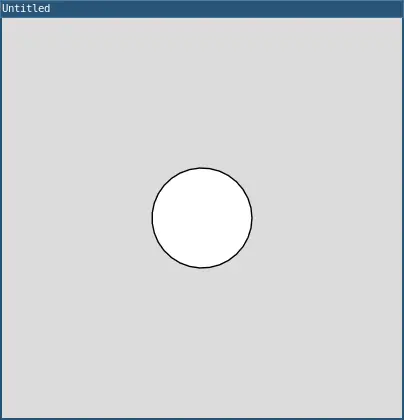
circle(200, 200, 100)
Your complete code should look like this:
require("L5")

function setup()
  size(400, 400)
end

function draw()
  background(220)
  circle(200, 200, 100)
end
Save and run your sketch again. You should see a white circle in the center of the window!
Congratulations, you just wrote your first program 🎉
What You Created
The circle(200, 200, 100) line tells the computer to draw a circle:
- 200 pixels from the left edge
- 200 pixels from the top edge
- With a diameter of 100 pixels
Try changing those numbers and see what happens! Can you:
- Make the circle bigger?
- Move it to a different location?
- Draw it in a corner?
Experimenting is Key
One of the best things about coding is that you can experiment and see results immediately. Try things! Break things! That's how you learn.
If something doesn't work, that's okay - you'll get an error message that can help you figure out what went wrong. Everyone makes mistakes when coding, even experienced programmers.
What Can You Make with L5?
Here are some examples of what people have created with creative coding tools like L5:
- Interactive art installations
- Generative art (art created by algorithms)
- Data visualizations
- Games and simulations
- Music visualizers
- Educational tools
- Animated stories
- Scientific simulations
The possibilities are endless! L5 gives you the tools to bring your creative ideas to life through code.
Coding is Creative
You might think of coding as purely technical or mathematical, but coding is also deeply creative. When you code, you're:
- Solving problems creatively
- Designing experiences
- Making artistic choices
- Expressing ideas
- Building something from nothing
L5 sits at the intersection of art and code, making it a perfect tool for creative expression.
Getting Help
As you learn, you'll have questions. Here are some resources:
- L5 Reference (L5lua.org/reference) - Documentation for all L5 functions
- These tutorials - Step-by-step guides to learn coding fundamentals
- Error messages - They're not scary! They tell you what went wrong
- Experimentation - Try things and see what happens
The most important thing is to keep trying and have fun!
What's Next?
Over the next few tutorials, you'll learn:
- How to call functions to tell the computer what to do
- How to use variables to store and change values
- How to make decisions with if statements
- How to create animations
- How to respond to user input
- How to repeat code with loops
- How to organize your code with functions and objects
You'll build up these skills one step at a time, and before you know it, you'll be creating your own interactive programs!
Think About This
Before moving on to the next tutorial, take a moment to think:
- What programs do you use every day?
- What would you like to create with code?
- What creative ideas could you express through interactive art?
Keep these questions in mind as you learn - they'll help motivate you and give you ideas for projects!
Ready to Start?
Now that you understand what coding is and what L5 can do, you're ready to dive in!
The next tutorial will teach you about calling functions - the fundamental building block of programming in L5.
Let's get started!
Next tutorial: Calling Functions
This tutorial is adapted from Welcome to Coding by Happy Coding, licensed under CC BY 4.0.