textureMode()
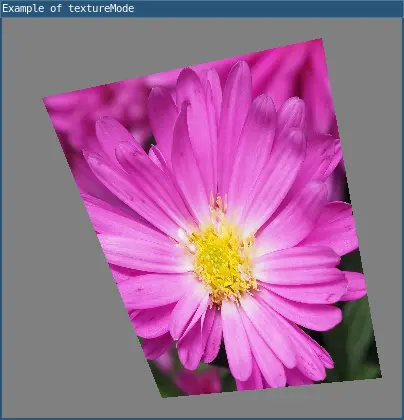
Changes the coordinate system used for textures when they’re applied to custom shapes. The default made is IMAGE, which refers to the actual coordinates of the image in pixels. NORMAL refers to a normalized space of values ranging from 0 to 1.
In order for texture() to work correctly, a shape needs a way to map the points on its surface to the pixels in an image. Custom shapes created with vertex() require texture mappings to be passed as uv coordinates.
Each call to vertex() must include 4 arguments, as in vertex(x, y, u, v), to map the vertex at coordinates (x, y) to the pixel at coordinates (u, v) within an image.
If NORMAL is passed, as in textureMode(NORMAL), then the texture’s uv coordinates can be provided in the range 0 to 1 instead of the image’s pixel dimensions. This can be helpful for using the same code for multiple images of different sizes.
Examples
require("L5")

function setup()
  size(400, 400)
  windowTitle("Example of textureMode")
  noStroke()
  img = loadImage("assets/flower.jpg")
  beginShape()
  texture(img)

  -- flower image is 3100x3100 pixels
  vertex(40, 80, 0, 0)
  vertex(320, 20, 3100, 0)
  vertex(380, 360, 3100, 3100)
  vertex(160, 380, 0, 3100)
  endShape()
  describe("wrapping a flower texture around a polygon and specified u,v mapping")
end
require("L5")

function setup()
  size(400, 400)
  windowTitle("Example of textureMode")
  noStroke()
  img = loadImage("assets/flower.jpg")
  beginShape()
  texture(img)
  textureMode(NORMAL)

  vertex(40, 80, 0, 0)
  vertex(320, 20, 1, 0)
  vertex(380, 360, 1, 1)
  vertex(160, 380, 0, 1)
  endShape()
  describe("wrapping a flower texture around a polygon and specified u,v mapping")
end
Syntax
textureMode(mode)
Parameters
Either IMAGE or NORMAL.
Related
This reference page contains content adapted from p5.js and Processing by p5.js Contributors and Processing Foundation, licensed under CC BY-NC-SA 4.0.