vertex()
Adds a vertex to a custom shape.
vertex() sets the coordinates of vertices drawn between the
beginShape() and
endShape() functions.
The first two parameters, x and y, set the x- and y-coordinates of the
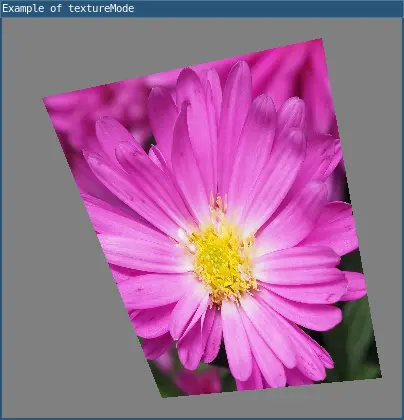
vertex. Two additional parameters u and v must be added for any custom shape with an image texture. These map the coordinates of the source texture image, and can be specified in pixels (IMAGE, the default mode) or normalized (NORMAL) with textureMode().
Examples
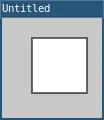
require("L5")

function setup()
  size(100, 100)

  background(200)

  -- Style the shape.
  strokeWeight(3)

  -- Start drawing the shape.
  beginShape()

  -- Add the vertices.
  vertex(30, 20)
  vertex(85, 20)
  vertex(85, 75)
  vertex(30, 75)

  -- Stop drawing the shape.
  endShape()

  describe('Using custom shape and vertices to define a square.')
end
require("L5")

function setup()
  size(400, 400)
  windowTitle("Example of textureMode")
  noStroke()
  img = loadImage("assets/flower.jpg")
  beginShape()
  texture(img)

  -- flower image is 3100x3100 pixels
  vertex(40, 80, 0, 0)
  vertex(320, 20, 3100, 0)
  vertex(380, 360, 3100, 3100)
  vertex(160, 380, 0, 3100)
  endShape()
  describe("wrapping a flower texture around a polygon and specified u,v mapping")
end
Syntax
vertex(x, y)
vertex(x, y, u, v)
Parameters
| Parameter | |
|---|---|
| x | Number: x-coordinate of the vertex. |
| y | Number: y-coordinate of the vertex. |
| u | Number: horizontal coordinate of the texture mapping. |
| v | Number: vertical coordinate of the texture mapping. |
Related
This reference page contains content adapted from p5.js and Processing by p5.js Contributors and Processing Foundation, licensed under CC BY-NC-SA 4.0.